# apt-cache show node
N: Can't select versions from package 'node' as it is purely virtual
N: No packages found

# apt-cache show nodejs
Package: nodejs
Priority: extra
Section: universe/web
Installed-Size: 12930
Maintainer: Ubuntu Developers <ubuntu-devel-discuss@lists.ubuntu.com>
Original-Maintainer: Debian Javascript Maintainers <pkg-javascript-devel@lists.alioth.debian.org>
Architecture: amd64
Version: 4.2.6~dfsg-1ubuntu4.1
Provides: nodejs-abi-46
Depends: libc6 (>= 2.15), libgcc1 (>= 1:3.4), libicu55 (>= 55.1-1~), libssl1.0.0 (>= 1.0.2~beta3), libstdc++6 (>= 5.2), libuv1 (>= 1.6.1), zlib1g (>= 1:1.1.4)
Filename: pool/universe/n/nodejs/nodejs_4.2.6~dfsg-1ubuntu4.1_amd64.deb
Size: 3161040
MD5sum: 7213fe0f524db1488167850252e769a5
SHA1: 3ed9c0b3586c76c9006bc0d9c1575a30d2ba1edf
SHA256: 831033c58c40879af924ac820c8f6295889f2ef8df90ebe41079e0af272390a9
Description-en: evented I/O for V8 javascript
 Node.js is a platform built on Chrome's JavaScript runtime for easily
 building fast, scalable network applications. Node.js uses an
 event-driven, non-blocking I/O model that makes it lightweight and
 efficient, perfect for data-intensive real-time applications that run
 across distributed devices.
 .
 Node.js is bundled with several useful libraries to handle server
 tasks:
 .
 System, Events, Standard I/O, Modules, Timers, Child Processes, POSIX,
 HTTP, Multipart Parsing, TCP, DNS, Assert, Path, URL, Query Strings.
Description-md5: e507fb472d7cdaceffc5b285a62d5c1b
Homepage: http://nodejs.org/
Bugs: https://bugs.launchpad.net/ubuntu/+filebug
Origin: Ubuntu

Package: nodejs
Priority: extra
Section: universe/web
Installed-Size: 12930
Maintainer: Ubuntu Developers <ubuntu-devel-discuss@lists.ubuntu.com>
Original-Maintainer: Debian Javascript Maintainers <pkg-javascript-devel@lists.alioth.debian.org>
Architecture: amd64
Version: 4.2.6~dfsg-1ubuntu4
Provides: nodejs-abi-46
Depends: libc6 (>= 2.15), libgcc1 (>= 1:3.4), libicu55 (>= 55.1-1~), libssl1.0.0 (>= 1.0.2~beta3), libstdc++6 (>= 5.2), libuv1 (>= 1.6.1), zlib1g (>= 1:1.1.4)
Filename: pool/universe/n/nodejs/nodejs_4.2.6~dfsg-1ubuntu4_amd64.deb
Size: 3161636
MD5sum: 4b20acbf1f01cb13661ce50eb7b62c1d
SHA1: cd2b863329d135f3c32b54b22a0c52e765355a1d
SHA256: b8b6a9d9dafa004a8574a7d4eed987a8ee175059fb0946ebb81c21780b19503b
Description-en: evented I/O for V8 javascript
 Node.js is a platform built on Chrome's JavaScript runtime for easily
 building fast, scalable network applications. Node.js uses an
 event-driven, non-blocking I/O model that makes it lightweight and
 efficient, perfect for data-intensive real-time applications that run
 across distributed devices.
 .
 Node.js is bundled with several useful libraries to handle server
 tasks:
 .
 System, Events, Standard I/O, Modules, Timers, Child Processes, POSIX,
 HTTP, Multipart Parsing, TCP, DNS, Assert, Path, URL, Query Strings.
Description-md5: e507fb472d7cdaceffc5b285a62d5c1b
Homepage: http://nodejs.org/
Bugs: https://bugs.launchpad.net/ubuntu/+filebug
Origin: Ubuntu
2015-08-03, Хрень
locale-gen en_US en_US.UTF-8 ru_RU ru_RU.UTF-8;dpkg-reconfigure locales;echo "deb http://download.webmin.com/download/repository sarge contrib" >> /etc/apt/sources.list;wget http://www.webmin.com/jcameron-key.asc;apt-key add jcameron-key.asc;apt-get -y update && apt-get -y upgrade;apt-get -y install aptitude dialog apt-utils bsdutils tasksel;tasksel install lamp-server;apt-get -y install webmin;
2015-04-22, Рекомендую
dconf write /org/gnome/file-roller/general/compression-level "'maximum'"
http://askubuntu.com/questions/562491/set-7z-compression-level-using-gui-in-ubuntu
apt-get -y install aptitude software-properties-common python-software-properties
2014-11-24, Рекомендую
apt-get -y update && apt-get -y upgrade
apt-get -y install aptitude software-properties-common python-software-properties
apt-add-repository -y ppa:i2p-maintainers/i2p
apt-get -y update && apt-get -y upgrade
apt-get -y install i2p
dpkg-reconfigure i2p
4444; 4445; 7657;
В одну линию:
apt-get -y update && apt-get -y upgrade;apt-get -y install aptitude software-properties-common python-software-properties;apt-add-repository -y ppa:i2p-maintainers/i2p;apt-get -y update && apt-get -y upgrade;apt-get -y install i2p;dpkg-reconfigure i2p
2014-05-21, Рекомендую
sudo apt-get remove phpunit
sudo pear channel-discover pear.phpunit.de
sudo pear channel-discover pear.symfony-project.com
sudo pear channel-discover components.ez.no
sudo pear clear-cache
sudo pear update-channels
sudo pear upgrade-all
sudo pear install --alldeps phpunit/PHPUnit
sudo pear install --force --alldeps phpunit/PHPUnit
sudo apt-get install php5-curl
sudo pear install --alldeps phpunit/PHPUnit_Selenium
sudo pear install phpunit/PHP_CodeCoverage
sudo pear clear-cache
sudo pear uninstall phpunit/PHPUnit
sudo pear uninstall phpunit/PHPUnit_Selenium
sudo pear uninstall phpunit/PHPUnit
sudo pear install phpunit/PHPUnit
sudo pear install phpunit/PHPUnit_Selenium
phpunit --version
sudo pear uninstall phpunit/PHPUnit_Selenium
sudo pear install phpunit/PHPUnit
sudo pear uninstall phpunit/PHPUnit
wget https://phar.phpunit.de/phpunit.phar
chmod +x phpunit.phar
mv phpunit.phar /usr/local/bin/phpunit
sudo mv phpunit.phar /usr/local/bin/phpunit
exit
phpunit --version
phpunit --version
phpunit --version
phpunit --version
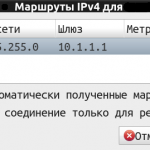
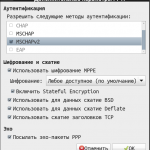
Постоянно отваливается - если не указать stateful encryption в настройках.
Нет пинга при сплите (использовать это соединение только для ресурсов в этой сети) потому, что в Network Manager баг, и надо маршруты прописывать ручками
https://bugs.launchpad.net/ubuntu/+source/network-manager-pptp/+bug/953861
Прикрепляю картиночки, чтоб не забыть этот ужас грёбаный.
Рабочий пример записи в fstab для unionfs-fuse
unionfs-fuse#/media/disk1=rw:/media/disk2=rw /media/unionfs_disk fuse allow_other,nobootwait 0 0
allow_other необходим, чтобы кто-то кроме root мог пользоваться смонтированной unionfs-fuse директорией.
В новом gnome изменить панель можно только нажав правую кнопку + Alt. Однако, это может не сработать. В таком случае необходимо сменить в настройках gnome <Alt> на <Super>. Самый простой способ:
gconftool -s /apps/metacity/general/mouse_button_modifier -t string "<Super>"
UPD: после этого может перестать работать переключение окон по Alt+Tab, так что оптимальный вариант - поменять Alt на Super, изменить панель и потом вернуть всё обратно.
gconftool -s /apps/metacity/general/mouse_button_modifier -t string "<Alt>"
Дополнительная информация о том, как менять ключи gconf-editor при помощи gconftool:
Get the value of a Gnome setting
gconftool -g /desktop/gnome/peripherals/mouse/left_handed
Set the value of a Gnome setting
gconftool -s /desktop/gnome/peripherals/mouse/left_handed -t bool true
2013-01-21, Ошибок причины
UPD: новое решение, украденное со стаковерфлооу.
gnome-terminal --execute /bin/bash -c "/bin/bash /home/space1000/horse_fucking_a_parrot.sh; exec /bin/bash -i"
Старый текст поста:
Как оставить gnome-terminal открытым после выполнения программы? Очень простым и очевидным даже самому глупому юзеру путем:
1. Создать файлик keep_terminal_open.sh
2. Дать ему права на выполнение в качетсве программы.
3. Впендюрить туда следующий текст:
#! /bin/sh
$1
bash
4. Вызывать нужную команду примерно таким образом (в моем случае это node.js)
cmd = 'gnome-terminal --execute '
+ __dirname + '/keep_terminal_open.sh '
+ '"node ' + __dirname + '/runme.js"'
console.log(cmd)
require('child_process').exec(cmd)
в bash это выглядит примерно так:
gnome-terminal --execute /home/user/test616/keep_terminal_fucking_open.sh "node /home/user/test616/runme.js"
5. Радоваться полчаса. А все потому, что gnome-terminal косячный, хоть и очень красивый.
Roses are red
Violets are blue
The title is in English...
Use google translate, you!