Россия достаточно велика чтобы порвать любую жопу, в которую её запихнут.
2013-08-04, Фраза дня
В новом gnome изменить панель можно только нажав правую кнопку + Alt. Однако, это может не сработать. В таком случае необходимо сменить в настройках gnome <Alt> на <Super>. Самый простой способ:
gconftool -s /apps/metacity/general/mouse_button_modifier -t string "<Super>"
UPD: после этого может перестать работать переключение окон по Alt+Tab, так что оптимальный вариант - поменять Alt на Super, изменить панель и потом вернуть всё обратно.
gconftool -s /apps/metacity/general/mouse_button_modifier -t string "<Alt>"
Дополнительная информация о том, как менять ключи gconf-editor при помощи gconftool:
Get the value of a Gnome setting
gconftool -g /desktop/gnome/peripherals/mouse/left_handed
Set the value of a Gnome setting
gconftool -s /desktop/gnome/peripherals/mouse/left_handed -t bool true
Чтобы установить вермя:
- Нажать PROGRAM
- Нажать MUTE
- Нажать 6
- Ввести цифры времени, напр. 1325
- Нажать PROGRAM
Чтобы перевести из импульсного/импульсный/impulse в тоновый/тональный/tone режим:
- Нажать PROGRAM
- Нажать MUTE
- Нажать 3
- Нажать 1
- Нажать PROGRAM
Инструкция к телефону:
Скачать инструкцию к телефону Panasonic KX-TS2365RU [ прямая ссылка ]
2013-07-22, Рекомендую
%a, %d %b %Y
%H:%M неделя #%W
выглядит как
Пн., 22 июля 2013
13:19 неделя #29
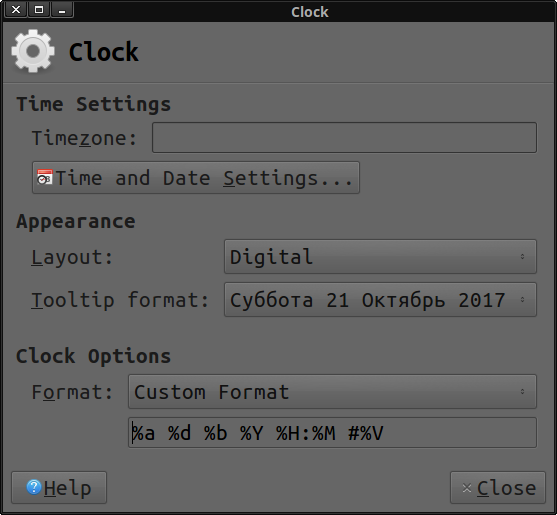
Но это было раньше, а теперь у меня другой любимый формат даты:
%a %d %b %Y %H:%M #%V
2013-07-09, Размышлятина
Пожар может (но не обязан) сниться, если вам во время сна черезчур жарко. В общем-то, это разновидность кошмаров.
2013-07-09, Размышлятина
Кошмары снятся для того, чтобы разбудить человека. Главный посыл - "проснись и исправь!" (что-либо).
2013-07-09, Размышлятина, Фраза дня
Будем честными: эти инструменты будут использоваться для зла, как мелкого, так и чудовищного: для торговли детской порнографией, для продажи наркотиков, для планирования убийств, для планирования терактов. Вам скажут, что вы вооружаете врага. Да, это так. Но эти инструменты не являются необходимыми и достаточными для совершения преступлений. Любой кухонный нож достаточно острый для того, чтобы порезать близкого вам человека; любой молоток достаточно тяжёлый для того, чтобы разбивать головы; любая машина движется со скоростью, достаточной для того, чтобы сбивать пешеходов. Они должны быть такими, чтобы выполнять свое предназначение, и в отношении информации всё обстоит ровно так же.
2013-07-03, Фраза дня
— Мастер, скажите, что вы хотели выразить в вашей последней картине?
— Не знаю... После моей смерти специалисты разберутся.
2013-06-19, Ошибок причины
xfreerdp подключался к windows server, но не хотел к windows 7. Выглядело это так:
$ xfreerdp xxx.xxx.xxx.xxx:3389
connected to xxx.xxx.xxx.xxx:3389
Password:
SSL_read: Failure in SSL library (protocol error?)
Authentication failure, check credentials.
If credentials are valid, the NTLMSSP implementation may be to blame.
Потом так
$ xfreerdp xxx.xxx.xxx.xxx:3389 --no-nla
connected to xxx.xxx.xxx.xxx:3389
Password:
SSL_read: Failure in SSL library (protocol error?)
Authentication failure, check credentials.
If credentials are valid, the NTLMSSP implementation may be to blame.
А потом оно заработало
$ xfreerdp --no-nla xxx.xxx.xxx.xxx:3389
connected to xxx.xxx.xxx.xxx:3389
Простое переставление параметра помогло. Эх-эх.
2013-06-13, Ошибок причины, Рекомендую
Неожиданно сам для себя, среди кучи неработающих решений (мой мозг так и не смог осилить в короткие сроки тот волшебный механизм, по которому работает mod_rewrite), я, кажется, нашел наконец решение, которое перенаправит ВСЕ запросы на index.php вне зависимости от того, существует файл, или не существует. И, вдобавок, без жесткого прописывания пути к index.php или названия домена. Автор этого решения добавил также возможность исключать некоторые запросы из перенаправления, так что, если это всё действительно правда и впоследствии не найдется никакой ошибки в работе данных директив, то я буду еще долго писать кипятком.
UPD: Изначальный код оказался неидеальным. Приходится добавить директиву DirectorySlash Off, иначе, если вы захотите убрать trailing slash с URL который попадает на реально существующую директорию, apache будет перенаправлять вас на http://site.com/directory/, а вы его обратно на http://site.com/directory и перенаправление попадёт в цикл, который никогда не завершится.
# Turn rewriting on
Options +FollowSymLinks
DirectorySlash Off
RewriteEngine On
# Redirect requests to index.php
RewriteCond %{REQUEST_URI} !=/index.php
RewriteCond %{REQUEST_URI} !.*\.png$ [NC]
RewriteCond %{REQUEST_URI} !.*\.jpg$ [NC]
RewriteCond %{REQUEST_URI} !.*\.css$ [NC]
RewriteCond %{REQUEST_URI} !.*\.gif$ [NC]
RewriteCond %{REQUEST_URI} !.*\.js$ [NC]
RewriteRule .* /index.php
Ссылка на оригинал: .htaccess redirect all requests to index.php
Оригинал полностью, на случай, если статья с оригинального сайта внезапно проебётся, как это уже не раз бывало со сслыками в сети Интернет.
htaccess Redirect All Requests to Index.php Script
So for one of my website projects I wanted to create a very basic content management system (of sorts). The plan was to have a header and footer template class, and include these from the ‘index.php’. The bit between the header and footer (‘content’) would then be pulled from another file, depending on the URL.
The basic set-up for this kind of CMS is that all requests are sent to one script, which handles working out which files need to be included based on the request URL. If we’re using Apache as our web server, we can do this easily enough using the .htaccess file.
A htaccess file (also known as a distributed configuration file) allows you to configure your web-server on a per-directory basis. One of the handy features of the htaccess file is that we can invoke server-side modules. We can use the mod_rewrite module to redirect or rewrite certain URL requests.
So to set-up our CMS, we need to rewrite all requests to any file on the server to ‘/index.php’. A first attempt at this might be:
    # Turn rewriting on
    Options +FollowSymLinks
    RewriteEngine On
    # Redirect requests to index.php
    RewriteRule .* /index.php
This looks OK, until you think about what will actually happen. We’re redirecting ALL requests to ‘index.php’ – including requests to ‘index.php’… They call this infinite loopage in the biz’. Our next (and much better attempt) would be:
    # Turn rewriting on
    Options +FollowSymLinks
    RewriteEngine On
    # Redirect requests to index.php
    RewriteCond %{REQUEST_URI} !=/index.php
    RewriteRule .* /index.php
This will work well – unless you have things like images, stylesheets, JavaScript or generally any other files we’ve come to expect in a rich internet experience. We can fix this by also excluding requests to these filetypes from the rewrite:
    # Turn rewriting on
    Options +FollowSymLinks
    RewriteEngine On
    # Redirect requests to index.php
    RewriteCond %{REQUEST_URI} !=/index.php
    RewriteCond %{REQUEST_URI} !.*\.png$ [NC]
    RewriteCond %{REQUEST_URI} !.*\.jpg$ [NC]
    RewriteCond %{REQUEST_URI} !.*\.css$ [NC]
    RewriteCond %{REQUEST_URI} !.*\.gif$ [NC]
    RewriteCond %{REQUEST_URI} !.*\.js$ [NC]
    RewriteRule .* /index.php
And there you have it! A (useful) .htaccess file used to redirect all requests to the index.php file! Now for that CMS…
This entry was posted on Sunday, March 14th, 2010 at 6:18 pmand is filed under PHP.