- Accessible OneTwo
Автор: tagawa - Fitzgerald
Автор: Daniel Barbu - Inkblot
Автор: Michael Sisk - Light Green
Автор: Agroturystyczne - Minimize
Автор: Slocum Design Studio - RCG Forest
Автор: Rui Carlos Gonçalves - Serena
Автор: Kanga Bell Co. - Tabula Rosa
Автор: Leo Newball, Jr. - Twenty Twelve
Автор: Команда WordPress
2013-10-27, Рекомендую
Рабочий пример записи в fstab для unionfs-fuse
unionfs-fuse#/media/disk1=rw:/media/disk2=rw /media/unionfs_disk fuse allow_other,nobootwait 0 0
allow_other необходим, чтобы кто-то кроме root мог пользоваться смонтированной unionfs-fuse директорией.
2013-10-11, Рекомендую
Очень понравился сервис генерации картинок из текста, хотя он и без наворотов. Запишу его сюда, чтобы не забыть.
http://www.email2image.com/Convert-Email-to-Image.aspx
Поскольку sed не использует регулярные выражения, а вместо регулярных выражений использует морально устаревшее, труднообъяснимое, мало понятное непойми что, мы его заменим конструкцией
perl -0777pe 's/search/replace/g' -i filename
Где
-0777 - символ, использующийся в качестве построчного разделителя вместо стандартного \n (значения от 0400 и выше заставят perl обработать сразу весь файл целиком в один заход, но 0777 является общепринятым соглашением для этой цели).
-p - встраивает вводимый вами код на perl в "печатающий цикл", который будет обрабатывать stdin построчно.
-e - Позволяет передать исполняемый код в качестве аргумента, а не файла.
-i - Заменяет строки указанного входного файла на результаты вывода perl.
Живой работающий пример:
perl -0777pe 's#(\s+else[\s]+)cnf="\$1/openssl.cnf"(\s+fi)#$1cnf="\$1/openssl-1\.0\.0\.cnf"$2#g' -i /etc/openvpn/easy-rsa/2.0/whichopensslcnf
Пользителка (пользявка) для .bashrc
greplace()
{
  perl -0777pe "$1" -i $2
}
Или, что еще удобней и безопасней (-i надо добавлять вручную, чтоб заменило, а без -i в stdout для отладки выводить будет просто):
greplace()
{
  perl -0777pe "$1" $2 $3
}
А теперь заменим все "echo" внутри файла filename на адрес нашего айпишника, который выдаст нам curl из своего stdout (при условии, что сервис по адресу http://myip.dnsomatic.com доступен и работает исправно, чего я гарантировать не могу).
greplace 's/echo/'`curl -s http://myip.dnsomatic.com`'/g' -i filename
На случай, если http://myip.dnsomatic.com или какая-либо другая команда, будет возвращать данные с пробелами или символом ", обернём `curl -s http://myip.dnsomatic.com` в "".
greplace 's/echo/'"`curl -s http://myip.dnsomatic.com`"'/g' -i filename
И ещё можно вынести за скобки s
greplace()
{
  perl -0777pe s"$1" $2 $3
}
и писать вот так
greplace /search/replace/g filename
Правда без использования кавычек \ придётся экранировать: \\
greplace /\\s+/_/g filename
Спасибо всем этим прекрасным людям, лучшим сынам своего отечества, без которых этот пост был бы невозможен:
http://stackoverflow.com/questions/3365260/match-and-replace-multiple-newlines-with-a-sed-or-perl-one-liner
http://stackoverflow.com/questions/6302025/perl-flags-pe-pi-p-w-d-i-t
http://perldoc.perl.org/perlrun.html#Command-Switches
Чтобы закрыть доступ к внешнему интернету, необходимо зайти на страницу
127.0.0.1:7657/i2ptunnelmgr
И в свойствах I2P HTTP Proxy и I2P HTTPS Proxy убрать значения "outproxy".
В моём случае это были "false.i2p" и "outproxyng.h2ik.i2p" соответственно.
После чего необходимо перезапустить роутер и дождаться инициализации туннелей.
To close external internet access provided through outproxies:
1. go to 127.0.0.1:7657/i2ptunnelmgr
2. delete "outproxy" value from "I2P HTTP Proxy" and "I2P HTTPS Proxy"
3. restart the i2p router and wait for tunnels initialization
2013-09-23, Рекомендую, Фраза дня
Задание выполнил успешно. Рекомендую.
2013-09-11, Рекомендую
Нашел функциию в интернете и слегка доработал её под свой стиль.
<?php

/**
 * Indents a flat JSON string to make it more human-readable.
 *
 * @param string $json The original JSON string to process.
 *
 * @return string Indented version of the original JSON string.
 */
function json_indent($json, $indentStr = "    ", $newLine = "n")
{

  $ind       = 0; // Current indention width
  $result    = ""; // Resulting string
  $indention = ""; // Current indention after newline
  $escaped   = false; // FALSE or escape character
  $strLen    = strlen($json);

  for($i = 0; $i < $strLen; $i++)
  {
    // Grab the next character in the string
    $char = $json[$i];

    if($escaped)
    {

      if($escaped == $char)
      {
        // End of escaped sequence
        $escaped = false;
      }

      $result .= $char;
      if ($char == "\\" && $i + 1 < $strLen)
      {
        // Next character will NOT end this sequence
        $result .= $json[++$i];
      }

      continue;
    }

    if ($char == '"' || $char == "'")
    {
      // Escape this string
      $escaped = $char;
      $result .= $char;
      continue;
    }

    if(($char == '{' || $char == '[') )
    {
      $indention = str_repeat($indentStr, $ind++);
      if($i > 0 && $json[$i-1] != "," && $json[$i-1] != "[" && $json[$i-1] != "{")
      {
        $result .= $newLine . $indention;
      }
    }
    // If this character is the end of an element,
    // output a new line and indent the next line
    if ($char == '}' || $char == ']')
    {
      $indention = str_repeat($indentStr, --$ind);
      $result .= $newLine . $indention;
    }

    // Add the character to the result string
    if($char == ":")
    {
      $result .= " $char ";
    }
    else
    {
      $result .= $char;
    }

    // If the last character was the beginning of an element,
    // output a new line and indent the next line
    if ($char == ',' || $char == '{' || $char == '[')
    {
      if ($char == '{' || $char == '[')
      {
        $indention = str_repeat($indentStr, $ind);
      }
      $result .= $newLine . $indention;
    }

  }

  return $result;
}
Печатает примерно такое:
{
    "fileCount" : 2,
    "data" :
    [
        {
            "id" : "file.1",
            "class" : "file",
            "file" : "example_file.1.html",
            "display" : "example_file.1",
            "extension" : "html",
            "size" : 12345,
            "hasVersions" : true,
            "versions" :
            {
                "fileCount" : 1,
                "data" :
                [
                    {
                        "id" : "file.1.1",
                        "class" : "file",
                        "file" : "example_file.1.1.html",
                        "display" : "example_file.1.1",
                        "extension" : "html",
                        "size" : 12345,
                        "hasVersions" : false,
                        "versions" : null
                    }
                ]
            }
        },
        {
            "id" : "file.2",
            "class" : "file",
            "file" : "example_file.2.html",
            "display" : "example_file.2",
            "extension" : "html",
            "size" : 12345,
            "hasVersions" : false,
            "versions" : null
        }
    ]
}
Обратить внимание что сначала вевеве, чтобы не было с шиттп-вевеве на шиттпс-вевеве а потом на без-вевеве-шиттпсю.
Универсальный вариант, остальные сука блядь не работают заебёшься редиректы потом глотать по серверам.
RewriteEngine On
RewriteCond %{HTTP_HOST} ^www\.(.*)$ [NC]
RewriteRule .* https://%1%{REQUEST_URI} [R=301,L]
RewriteCond %{HTTPS} off [OR]
RewriteCond %{SERVER_PORT} ^.
RewriteCond %{SERVER_PORT} !443 [OR]
RewriteCond %{HTTP:X-Forwarded-Proto} ^.
RewriteCond %{HTTP:X-Forwarded-Proto} !https [NC]
RewriteRule .* https://%{HTTP_HOST}%{REQUEST_URI} [R=301,L]
Гори в аду, сраная срань:
Скотское блядской гнидоуёбище высосавшее из меня все тризхамудохуеблядские нервы мразь ::::
Starting with Apache 2.4 you can also use the variable %{REQUEST_SCHEME} to preserve the scheme:
RewriteRule "^" "%{REQUEST_SCHEME}://sub.domain.com:2368%{REQUEST_URI}" [P,QSA,L]
No need to meddle with any conditions this way.
RewriteEngine on
RewriteCond %{HTTP_HOST} ^www\.(.*)$ [NC]
RewriteRule .* %{REQUEST_SCHEME}://%1%{REQUEST_URI} [R=301,L]
RewriteEngine On
RewriteBase /
RewriteCond %{HTTP_HOST} ^www\.(.*)$ [NC]
RewriteRule .* https://%1%{REQUEST_URI} [R=301,L]
RewriteCond %{SERVER_PORT} !443
RewriteRule .* https://%{HTTP_HOST}%{REQUEST_URI} [R=301,L]
Но на серверах, что настраивали дебилы, всё может быть гораздо сложнее:
RewriteEngine On
RewriteBase /
RewriteCond %{HTTP_HOST} ^www\.(.*)$ [NC]
RewriteRule .* https://%1%{REQUEST_URI} [R=301,L]
RewriteCond %{HTTP:X-Forwarded-Proto} !https [NC]
RewriteRule .* https://%{HTTP_HOST}%{REQUEST_URI} [R=301,L]
Beb vnojn dndhn,nstkm ktp^
RewriteEngine On
RewriteBase /
RewriteCond %{HTTP_HOST} ^www\.(.*)$ [NC]
RewriteRule .* https://%1%{REQUEST_URI} [R=301,L]
RewriteCond %{HTTPS} off
RewriteRule .* https://%{HTTP_HOST}%{REQUEST_URI} [R=301,L]
Как било на сайти с вевеве (site.ru ----> www.site.ru).
RewriteEngine On
RewriteCond %{HTTP_HOST} !^www\..* [NC]
RewriteRule ^(.*)$ https://www.%{HTTP_HOST}/$1 [R=301,L]
RewriteCond %{HTTP:X-Forwarded-Proto} !https [NC]
RewriteRule (.*) https://%{HTTP_HOST}%{REQUEST_URI} [R=301,L]
Скобочки .(.*) нужны без них не работает ибо %1 берётся из RewriteCond, а $1 из Rule
Безусловный редирект нахуй и в пизду (без слеша после домена ибо слеш уже воткнут в %{REQUEST_URI}
RewriteEngine on
RewriteRule .* https://__EXAMPLE.COM__%{REQUEST_URI} [R=301,L]
2013-08-20, Рекомендую
Стили: shimmerproject-Albatross-0396113
Значки: elementary Xfce dark
Шрифты: Ubuntu mono 15
DPI: 110
2013-07-22, Рекомендую
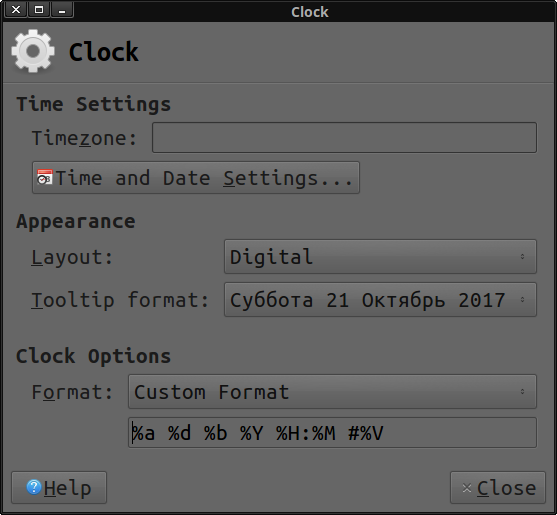
%a, %d %b %Y
%H:%M неделя #%W
выглядит как
Пн., 22 июля 2013
13:19 неделя #29
Но это было раньше, а теперь у меня другой любимый формат даты:
%a %d %b %Y %H:%M #%V